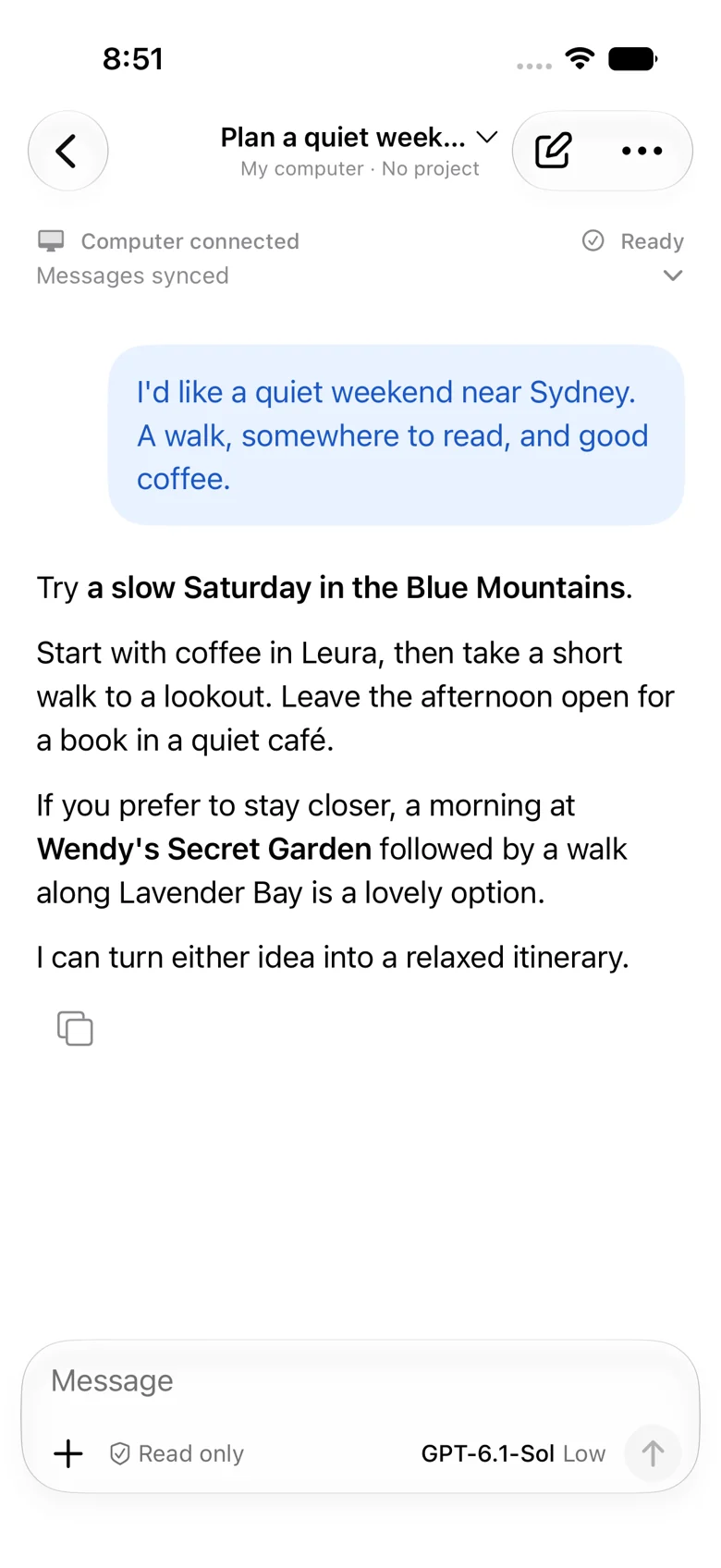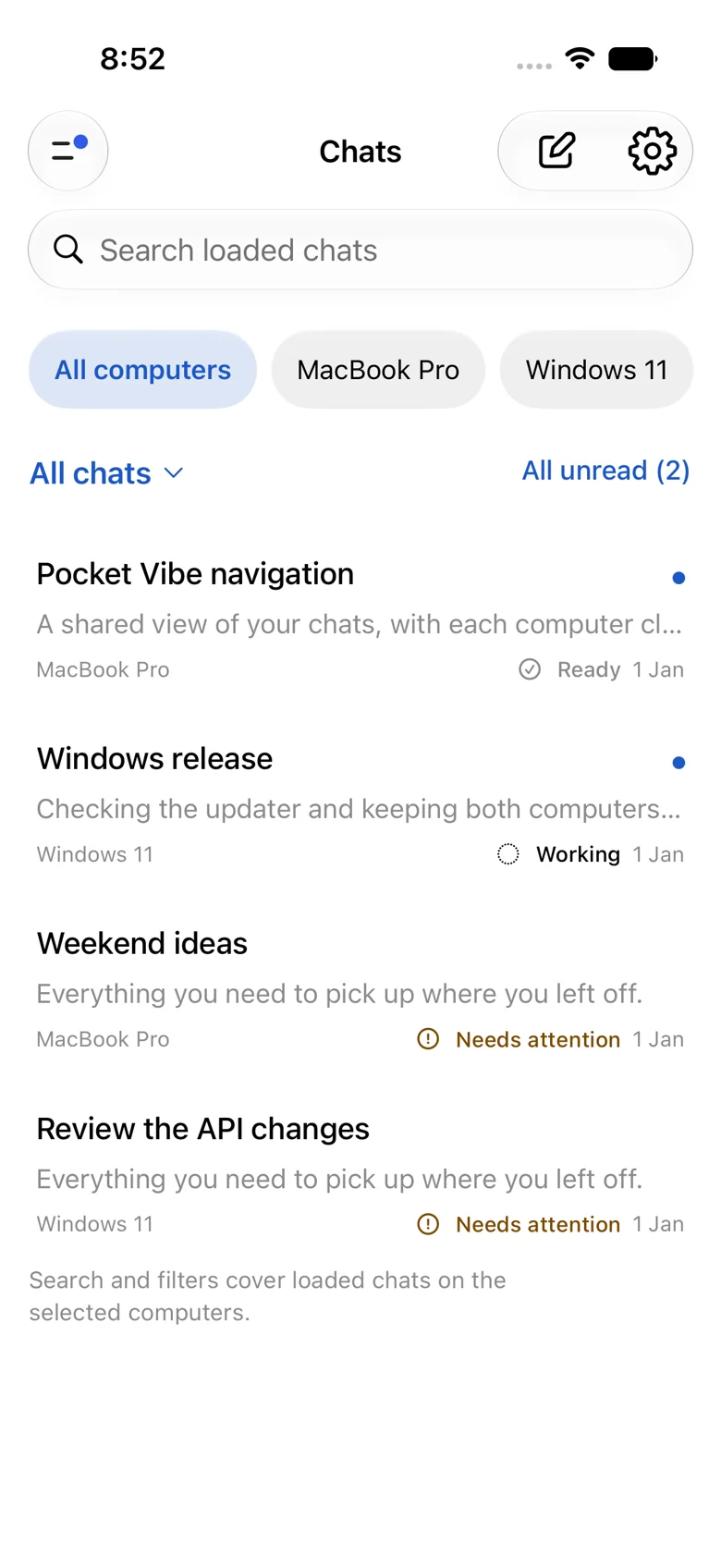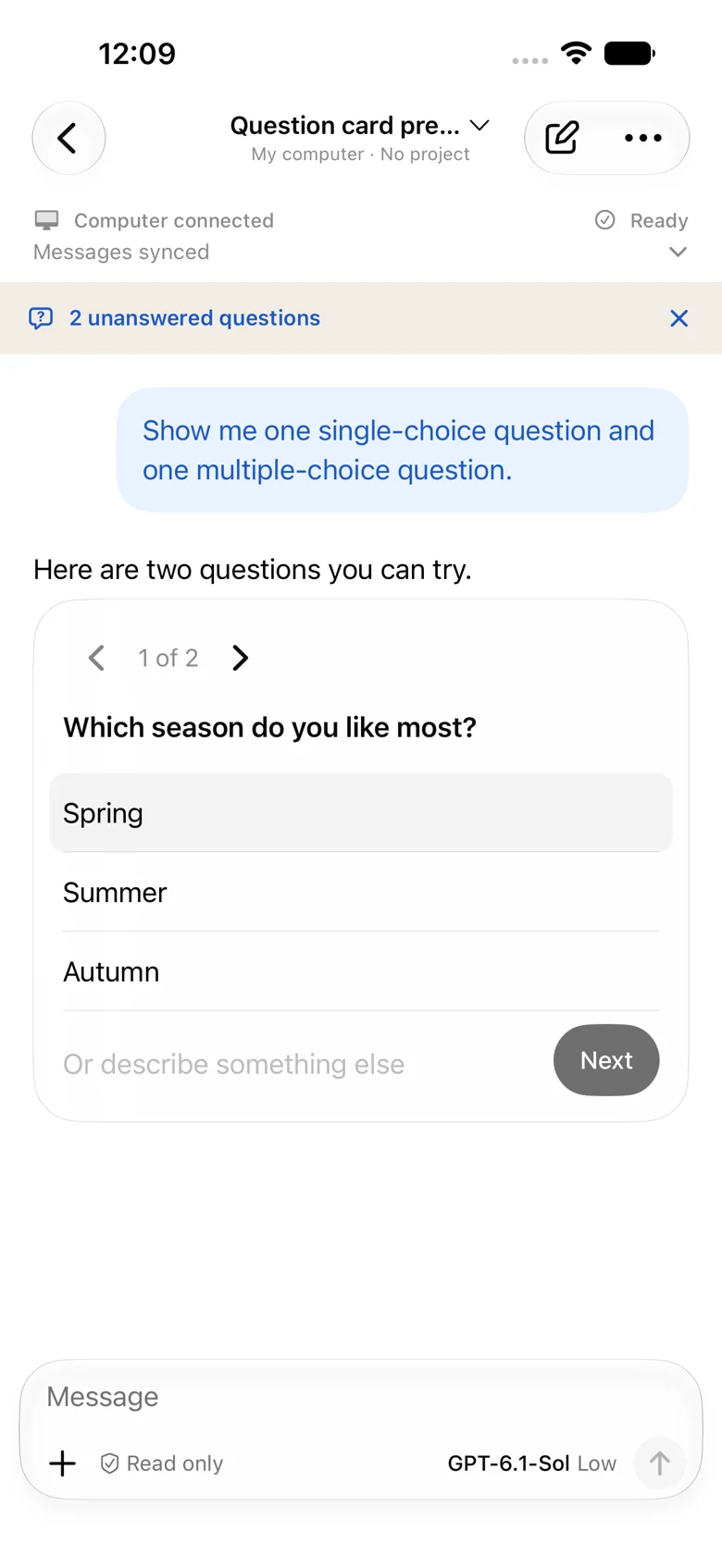
End-to-end encrypted.
Chats, files and screenshots are encrypted between verified devices over Direct or Relay. The relay cannot decrypt them. Read the privacy policy ↗
RELEASE NOTES
End-to-end encryption across iPhone, Mac and Windows. One QR scan connects your devices and checks your computer access.
Chats, files and screenshots are encrypted between verified devices over Direct or Relay. The relay cannot decrypt them. Read the privacy policy ↗
Connect new and saved computers through the same flow. Pocket Vibe checks your computer access and preserves a recognized computer’s place. Connection guide ↗
While using Relay, the iPhone periodically checks for Direct. Brief interruptions retry quietly, and saved chats remain readable. Connection improvements ↗
01 / iOS
Keep files selected in the system file picker attached to the current chat when the system picker closes before completing its selection callback.
Install the Mac companion from iPhone using Remote Login, confirm its SSH fingerprint, and continue into verified pairing. Open shared or Camera invitation links directly in Pocket Vibe. The Mac guides permission approval while existing chats and drafts stay available.
Use less data for messages and large chat results with Mac native build 170 or Windows package 1.0.68. Content is compressed before end-to-end encryption when this saves space. Older computers continue to connect.
Share a dedicated computer installation page from the welcome screen or setup guide. Follow the Mac or Windows installer and scan the computer QR code. Computer details prepare updates even before the update section scrolls into view.
Use less data over Relay when connecting to Mac native build 168 or Windows package 1.0.66. Chats and attachments stay end-to-end encrypted. Existing computers and pairing remain compatible.
Recover an unconfirmed archive with an explicit retry after checking its status. Requires Mac native build 164. Keeps the chat visible until archive confirmation.
Try available P2P exits together and switch to a meaningfully lower-latency connection after pending messages finish. The chat status identifies the selected computer exit with a short Wi-Fi, VPN or Wired label. Requires Mac native build 163.
Connect through P2P across networks with Mac native build 160. The chat status shows the actual selected Direct, P2P or Relay route. Existing pairing and encryption remain in place.
Restart the desktop chat app or Pocket Vibe Server from computer details. Confirm each restart and choose force restart separately if normal quitting times out. Keep checking the original request after reconnecting.
Requires Mac native build 158 or Windows package 1.0.64 and an available encrypted control connection. Pairing and settings are preserved.
Fork Chat creates an independent conversation with your saved history and settings. It opens on iPhone and appears in Chats and Recents. Your original draft stays in its chat, and creating a fork sends no message.
Existing Side Chats remain accessible in the ordinary chat list. The separate Side Chats section is removed. Fork requires Mac native build 157 and the updated desktop connection.
Attach PDF, PowerPoint, Word, Excel and other files in new or existing chats. Choose Files from the attachment menu or paste a copied file. Check its filename and size before sending. Keep file drafts and retry interrupted uploads.
Up to four attachments per message and 32 MB per file. Update to Mac 153 or Windows 62 to send files.
Show Archive not confirmed when the computer has accepted an archive action but has not confirmed its outcome. Keep the chat visible and use Check status to check the original request without sending it again. A later confirmed archive removes the chat from the list.
Update to Mac native build 151 for the matching archive delivery fix.
See new chats in Chats and Recents immediately after sending, including pending and recovery states. Keep browsing while the computer creates the chat and generates its title. Select a model and effort without reopening the panel.
Long press a Recent chat to rename, mute, archive or delete it with the same confirmations as Chats. Update to Mac 150 or Windows 60 for creation identity and automatic naming improvements.
Show outgoing messages immediately and send in the background. Keep editing while waiting, retry failed messages, or cancel their local send state. Confirm delivered question answers automatically after reconnecting.
New chats open before history finishes loading and inherit the selected computer's permission. Scheduled jobs now offer deletion with confirmation. Use Mac 147 or Windows 58 for the companion changes.
Recover interrupted connections while iOS still grants background time. Keep Direct eligible after iOS invalidates a suspended socket, avoiding an unnecessary Relay detour. Preserve retry limits and protection against duplicate sends. Update to Mac native build 145 to prevent bursts of synchronization acknowledgements from closing healthy connections. iOS still controls background execution time.
Refresh saved chat and Work lists when iOS grants background time. Silent update notifications request synchronization when the phone stops receiving encrypted updates. Resume failed connections sooner after returning to the app. No persistent progress indicator is added. Background timing and duration remain controlled by iOS. Update to Mac native build 144 for silent update wakeups. Existing pairing and drafts are preserved.
Identify completed replies and requests by their chat titles in notifications. Titles are decrypted locally before display, keeping end-to-end encryption intact. Notifications fall back to a generic alert when decryption is unavailable. Update your desktop companion to release 191 and open Pocket Vibe once to enable encrypted titles.
Requires Mac native build 137 or Windows package 1.0.54 for job data. Account-managed jobs remain in the desktop app. Preserves pairing and saved settings.
Works with Mac native build 136 and Windows package 1.0.53. Preserves pairing and saved settings.
Requires Mac native build 136 or Windows package 1.0.53 for visualization files. Refresh older replies after updating the companion. Preserves pairing and saved settings.
Preserves existing subscriptions, exemptions and paired computers. Desktop packages are unchanged.
See a clear result when Apple returns without confirming a purchase. Keep interruption details when revisiting subscription plans, and copy them when reporting a purchase that stopped after password entry. If a transaction was received but access verification was interrupted, retry verification without purchasing again. The reported Apple authentication interruption still requires physical-device verification.
Subscribe through Apple’s purchase flow without extra installation-record verification for ordinary subscriptions. Restore active subscriptions using their verified transactions. Retry Apple connection failures without another sign-in prompt from Pocket Vibe, and copy safe diagnostic details when reporting a failure. Apple’s purchase authentication may still request a password or Face ID.
Browse a short introduction, subscription options and a free computer setup guide before account verification. Choose a trial, monthly or annual plan, then connect with a fresh QR code after subscription verification. Keep preparation progress and plan selection when reopening. Retry access verification for a completed purchase without purchasing again.
Avoid repeated cache writes when retained run errors have not changed. Align periodic chat status with its last check and mark it out of date at the 15-second boundary. Saved failures remain available when error history cannot refresh.
Keep saved run errors when history cannot refresh. Show current failures before messages load and retry causes during periodic sync. Recovered state takes priority over old errors, reconnecting cannot promote earlier state into a current error, and error guidance remains readable at accessibility text sizes.
See why a model request stopped, including HTTP 413 and connection failures. Chat status shows automatic retries, the failure reason and a suggested next step. Recent errors remain available after reopening the chat, and a healthy live run clears the old failure status. Error details require Mac 127 or Windows 48.
Keep writing when your computer’s provider list is unavailable. Choose Edit draft to continue with a saved or new draft, then return to provider selection when ready.
Sending stays unavailable until a provider is verified. Edited text and the selected provider are preserved. Mac native build 126 and Windows package 1.0.46 remain compatible.
Fixes a connection recovery race that could interrupt screenshots. A short network interruption retries the capture once, with recovery progress, a bounded wait and clearer final errors.
Existing encrypted pairing and saved screenshots are preserved. Mac native build 125 and Windows package 1.0.44 remain compatible.
Model and permission settings load independently. A slow model read no longer blocks available permissions, and failed reads offer a retry. Corrects the unavailable Side chats message on Windows.
Use Mac native build 124 or Windows package 1.0.43 to restore live status and settings for large chats containing tool screenshots. Windows Side chats remain unsupported. Existing encrypted connections, chats and drafts are preserved.
Invited TestFlight testers with a valid redeemed code can connect computers beyond the Basic and Pro plan limits. Subscription shows the connected computer count with no plan limit. Existing redeemed accounts receive this after updating and checking Subscription.
Ordinary subscriptions retain their existing limits. Secure pairing, online access renewal and code revocation still apply. Mac native build 123 and Windows package 1.0.42 remain compatible.
Connecting a computer now shows subscription checks, waiting for your computer and device verification. Cancel keeps your saved computers and retry information.
If subscription verification is temporarily unavailable, try again without being prompted to purchase again. A successful retry or restore continues the same invitation. Full computer places link to Subscription management, and recognized computers reuse their place.
Mac native build 123 and Windows package 1.0.42 remain compatible. End-to-end encryption, saved pairing, chats and drafts are preserved.
A shorter, clearer privacy policy explains end-to-end encryption first, then AI provider processing, connection records and your data controls. The policy is available offline before and after connecting.
This update clarifies existing protections without changing data handling. Mac native build 123 and Windows package 1.0.42 remain compatible.
Use the same computer QR scanner for Mac and Windows. The setup guide includes both downloads and the privacy policy describes encrypted Windows connections. Use Windows package 1.0.42 for one-scan setup. Existing subscriptions and saved chats remain available.
Connect with one Mac QR scan. Subscription activation and saved-computer recognition happen automatically. Reuse an existing computer place and keep chats and drafts when reconnecting. Use Mac native build 123 for the unified setup flow.
Connect an existing personal Mac to your active subscription from computer details. Verify its new QR code and keep the previous connection as saved chats and drafts. Requires Mac native build 122 for personal connection recovery.
While using Relay, check for Direct every 30 seconds and switch automatically when a verified local connection is ready. Keep using the app without switching it to the background or reconnecting manually.
Finish pending requests before switching and renew live chat updates on the new connection. Use Mac native build 121 for refreshed local addresses. Existing pairing and chats are preserved.
Startup, unlock and brief interruptions retry quietly before showing temporary connection errors. Keep saved messages readable with their freshness status and retry controls.
Verified iPhone and Mac connections use end-to-end encryption. The Chat header shows Direct or Relay. Pairing and existing chats are preserved.
Maintenance update for chat drafts, attachments and interrupted chat creation. Fixes links to sections within HTML previews on iOS 18.
Requires iOS 18 or later. Existing chats, subscriptions and connections remain available.
Start a new chat by pulling up from the resting bottom. Scrolling from earlier messages keeps the normal bounce without opening a new chat. New chats use the same Camera, Photos and Skills menu as existing chats, with photos and videos supported in the first message. Keep unfinished attachment imports and unsent drafts when reopening the composer.
Requires iOS 18 or later. First-message attachments are available in Sandbox testing with Mac native build 106 or Windows package 1.0.39.
Ignore reminders now clears Needs answer from the chat list and Needs attention filter. New questions still appear, and Working and approval states are preserved. Requires desktop release 146.
Update the computer companion to release 141 for deletion and verified Mac archiving. Project files and separately saved screenshots are preserved.
Desktop release 140 restores mobile cards for long commands and adds approval notifications. Preserves existing chats, drafts, attachments and pairing.
Insert recognized text into your draft with Apple’s native Scan Text. Capture a chat screenshot after checking its window title and waiting for a stable picture, with a clear timeout and retry. Update the desktop companion to release 138 for this screenshot check.
Use the refined native attachment panels and camera controls. Open Screenshot directly from a chat menu to open the selected chat on your computer and capture its window.
Choose photos in a wider rounded panel near the bottom of the screen, with separate glass Back, All Photos and Add controls. Tap outside to return to your draft, or expand All Photos while keeping your selection.
Choose selected photos or full library access when first opening Photos. Your choice is remembered. If you decline library access, you can still attach individual items through the system photo picker.
Take a photo directly from the attachment menu and review it before adding it to your draft. Keep the message field visible under the menu, with compact camera and photo panels when collapsed and full pages when expanded. Keep selected photos when opening All Photos, alongside Original uploads and Skills.
Feel a heavier haptic when pulling up to the New chat trigger. Keep lighter feedback when pulling back, with no repeated vibration while holding or releasing. Preserve drafts and the selected computer.
Keep the Chats search prompt readable at the largest accessibility text sizes, including while entering and clearing a search. Native search, text scaling, filters and computer selection are preserved.
Update your desktop companion to release 121 to clear old question indicators whose answers are already saved.
Pairing again now opens the new connection details immediately. Saved chats remain available, and the active chat on another computer stays in place. Cancelled or unsuccessful pairing keeps the current page.
Includes regression checks for cancellation, computer isolation and list navigation.
Scroll the permission menu when it does not fit on screen. All access levels, custom-permission details, save errors and refresh controls remain reachable on smaller iPhones at the largest text sizes. Works in existing and new chats while preserving your draft.
Complete chat, computer and project names remain available to VoiceOver. Includes accessibility and compact-screen regression checks.
Includes regression checks for answering questions, keyboard dismissal, reading position and chat-link navigation.
Update installation still requires confirmation. Return during composition keeps its existing behavior, and offline drafts, attachments and quoted replies are preserved.
Live chat updates remain available. Unmuting restores unread indicators without replaying old notifications. Motion and contrast accessibility preferences remain respected.
Maintenance release that reorganizes chat state and synchronization while preserving drafts, pairing and notification settings. Improves the readability of the message placeholder in dark mode.
The reported missing Working-title animation remains under investigation and is not fixed in this release.
Update the desktop companion to release 110 for question indicators.
Available to the existing invited TestFlight group. Archiving requires Mac release 107 (native build 90) and uses an additional Codex model turn. Windows archiving was added later in desktop release 108 and also works with iPhone build 107 or later. Browse and restore archived chats on the computer.
Available to the existing invited TestFlight group. The chat-list toolbar is unchanged. Chat archiving is not included.
Connecting multiple iPhones requires iPhone build 98 or later on every phone and desktop release 98 or later. Existing saved chats and drafts remain available when a computer needs an update.
Model, effort and permission controls remain beside the input.
Retains the photo, video and sent-message improvements in build 95.
Requires desktop release 95-1 for coordinated sent-message and photo-preview synchronization.
Centered model and effort controls, reliable model-save dismissal, clearer Recents navigation, compact Skills rows and refined message spacing.
New white app icon and refinements to chat navigation, new-chat defaults, inline questions and composer controls.
Updated sidebar and toolbar, swipe-down keyboard dismissal, searchable Skills, and compact model and effort controls.
Rebuilt multi-computer navigation with a sidebar, isolated drafts and pending actions, a compact composer and light/dark chat presentation.
Show incompatible-computer notices with a direct route to its updater. Explain when the iPhone app must update first.
Use idle-aware WebSocket keepalives, reconnect on foreground return, and avoid redundant heartbeats during active traffic.
Receive conversation snapshots and streaming changes over WebSocket. Reconnect and recover missing sequences without resending uncertain actions.
Keep the chat header steady during live updates. Initial loads and manual refreshes still show progress.
Subscribe to events across paired computers and remove routine polling from computer details and healthy live sessions.
Render local HTML with WebKit and offer Source / Preview. Preserve native Markdown and system document previews.
Let the native keyboard recognize photo-only drafts as content while preserving composition and send validation.
Replace the filled unread button with a compact text link and retain accessible touch targets.
Add an all-computers Unread shortcut, including unread chats outside the currently loaded history.
Hide computer scope controls when only one computer is saved.
Hide the main tabs inside conversations, let users reorder computers, and preserve the latest failed Stop warning.
Browse all computers together, preserve each computer’s drafts and filters, and keep Stop results attached to the correct chat.
Fix Windows document links with drive letters and backslashes. Make Send and Stop visually compact while keeping full touch targets.
Add compact formula and offline Mermaid previews. Resolve phone question reminders when answers arrive from the desktop.
Put model, effort, permissions and notifications together in Chat details with shared settings editors.
Choose a model and reasoning effort for new chats, Work and subsequent turns in existing chats.
Choose an in-app or external browser for web links, with persistent preferences and fallback when a browser is unavailable.
Render LaTeX locally, preserve copyable source, and restore missing assistant-image previews in older cached messages.
Simplify chat-list rows by removing provider badges. Provider information remains in chat details.
Show assistant-created chats with empty previews, support same-computer chat links, and protect unread state during interrupted chats.
Introduce the Pocket Vibe name across the app, setup, notifications and subscription screens.
Simplify connection setup and split computer setup, subscriptions, notifications and software updates into focused pages.
Support two computers with Basic and five with Pro, preserving pairings when changing plans.
Suppress notifications for the chat currently visible in the foreground while continuing message and unread updates.
Use Send in question-answer inputs, preserve pasted line breaks, and avoid submitting unfinished input-method composition.
Send from the chat keyboard without losing focus. Make Answer the primary question action and move Ignore into its menu.
Create chats and Work from iPhone with recoverable drafts. Keep unanswered-question reminders across history pages and restarts.
Clarify computer compatibility and the hosted subscription requirement in the offline setup guide.
Use one connection code for activation and pairing, and resume interrupted setup.
Answer supported desktop questions from iPhone with delivery receipts and duplicate protection.
02 / MAC + WINDOWS
No iPhone update is required. Preserves pairing, settings, message identity and active chat state.
Show file citations as tappable source links and task summaries as readable titles and text. Apply the same formatting to saved and live replies, and restore source document access after reconnecting. Code examples, chats, pairing and settings are preserved.
Support verified installation from iPhone over SSH and return a private connection invitation. Open the native Mac permission guide during setup. Screen Recording and Mac control still require approval on the Mac. Existing pairing, settings, and Archive preferences are preserved.
Use less data for messages and large chat results with iPhone build 250. Messages are compressed before end-to-end encryption when this saves space. Older phones continue to connect, and pairing, settings and chats are preserved.
Install from the shared computer setup page. Mac shows the first connection QR code automatically. Both desktop apps guide you to open or download Codex, with clear retry actions. Windows offers the installer first and keeps the portable download available.
Existing pairing, settings and chats are preserved.
Send encrypted Relay traffic in a smaller binary format with iPhone 248. Preserve chats, pairing and saved settings. Older iPhones continue to connect.
Restore the iPhone connection after updating the native Windows ChatGPT app. Preserve existing chats and pairing, and keep ChatGPT running during later Pocket Vibe updates.
After installing this update, fully quit and reopen ChatGPT once. No iPhone update or new pairing is required.
Keep chats connected when a long conversation contains large tool results or images. History loads in smaller pages, and an oversized chat no longer disconnects your other chats. No iPhone update is required.
A smaller installer reduces download size while keeping all existing features, signed helpers and macOS 14 support. Pairing and settings are preserved. No iPhone update is required.
Fixes excessive background memory and CPU use that could repeatedly interrupt P2P connections. Keeps parallel Wi-Fi and VPN exits, automatic recovery and existing pairing. Adds diagnostic records for background connection-service exits. No iPhone update is required.
Archives the selected chat directly through the desktop runtime. Recovers expired unconfirmed requests without repeated keyboard input. Stops active work and pauses its Goal after confirmation. Pairing, drafts and history are preserved.
Make Wi-Fi, wired and VPN exits available to P2P in parallel. With iPhone 245, use measured latency to choose between connected exits and show the selected exit in chat. Existing pairing, Direct priority and encrypted Relay recovery remain available.
Automatically recovers final replies and chat status after missed desktop updates or reconnection. Removes resolved questions and approvals, preserves confirmed answers, and prevents stale partial replies from appearing twice.
Keeps live streaming, P2P, existing pairing and settings. iPhone remains on build 244.
Improves P2P connections over your Mac's physical network while a VPN is enabled, where the network permits direct connections. Automatically reconnects after network changes and keeps Relay available.
Use iPhone build 244 for P2P. Existing pairing and settings are preserved.
Use P2P across networks with iPhone build 244. Local Direct remains first choice, P2P is preferred over Relay, and the existing Relay remains available when a direct path cannot be established. Pairing, permissions and request receipts are preserved.
Fixes manual Server restart waiting indefinitely for asynchronous shutdown. Keeps pairing, settings and the desktop chat app open.
Restart the desktop chat app or Pocket Vibe Server locally or from iPhone. Chat stays open when Server restarts. An unresponsive chat app requires separate confirmation before force restart.
Mac native build 158 and Windows package 1.0.64 support iPhone build 240. Server restart preserves pairing, settings and existing background recovery. Installing updates temporarily block restart. Mac includes the signed Micro helper.
Create independent chat forks that retain saved history, project, model and permissions. Preserve the source reference and find both new forks and existing Side Chats in ordinary iPhone chat lists.
Mac native build 157 supports Fork Chat in iPhone build 239. Existing pairing, settings and the signed Micro helper are preserved.
Restore connections with Codex and ChatGPT Desktop 26.1117. Send messages, follow live replies, stop running turns and answer questions in your existing desktop chats.
After updating, finish running chats, fully quit ChatGPT or Codex, then reopen it while Pocket Vibe is running. Your chats, paired phones, settings and signed Micro helper are preserved. This update requires no new iPhone or Windows package.
Improve access renewal on slow networks and recover expired connections while preserving pairing and chats. Free computer places follow the time each computer first joined the account. Reconnecting, renaming and rearranging computer filters do not change that order.
Mac native build 155 and Windows package 1.0.63. Existing iPhone versions remain compatible.
Disconnect an old iPhone on this Mac even without internet access or an active subscription. Computers removed from a subscription can connect again by scanning a new QR code. Keep chats and settings while the new iPhone verifies its subscription.
Removed pairings stay removed after restarting the Mac app.
Receive ordinary file attachments from iPhone 235 with their filenames and sizes. Preserve upload checksums, resumable transfer, chat ownership and existing photo and video behavior. Mac native build 153 and Windows package 1.0.62.
Keep the latest reply notification for each chat, including recurring Heartbeat updates. New replies replace the existing notification and can still play a sound. Questions and approval requests keep their separate alerts. Update your computer app to enable this behavior with your current iPhone app.
Keep the archive input connection alive until Codex saves the target chat as archived. Unconfirmed actions keep their original request for status checks without repeating the archive input. Preserve pairing, settings and chat history.
Manage paired iPhones, taskbar display, Open at login, software updates and remote access from one scrollable main page. The separate Settings page and gear button are removed. Saved settings appear when the window opens, and returning from iPhone setup restores your place on the main page.
Uses native Windows controls and preserves pairing, settings and chats. No iPhone update is required.
Identify pending chat creations so iPhone 223 can replace provisional rows without duplicates. Generate short chat titles with the native metadata model when the selected provider offers it. Preserve manually edited titles, pairing and settings.
Keep Archive and Side Chat available when Codex removes unrelated agent bindings after reopening. Continue rejecting changed action keys, conflicting shortcuts and configuration changes during input. Preserve pairing, chats and custom settings.
Recover missing Codex Micro bindings after Codex fully exits, and show restart guidance until the saved mapping is loaded. Prevent Archive from being reported ready when its layout is missing. Preserve existing custom bindings, chats and pairing.
Mac native build 148. If Micro configuration is missing, fully quit Codex while Pocket Vibe stays running, then reopen Codex. Micro requires macOS 15 or later.
Messages appear immediately while the iPhone sends in the background. Failed sends offer retry or cancellation, and reconnecting confirms delivered answers automatically. New chats use the current desktop permission selection. Scheduled jobs can be deleted with a confirmed list refresh.
Mac native build 147 and Windows package 1.0.58. Update the iPhone through the existing internal TestFlight group.
Open source citations as readable document-title links on iPhone. Grouped citations retain every available source, including saved replies and live updates. Missing sources show a clear unavailable message instead of raw citation markers.
No iPhone update is required. Table layout, saved chats, pairing and Codex Micro are preserved.
Keep one pending synchronization acknowledgement per iPhone and merge newer changes until it responds. Prevent normal update bursts from closing a healthy Direct or Relay connection. Preserve pairing, silent update wakeups, request limits and Codex Micro. Use iPhone build 195 for the accompanying background recovery improvements.
Request a silent background update only when an iPhone stops acknowledging encrypted updates. Coalesce pending changes and cancel requests when reception resumes. Requires iPhone build 194 and the accompanying relay update. Preserves existing pairing, settings and Codex Micro. Background execution remains subject to iOS scheduling.
Recover pairing after an iPhone disconnects from this computer. Keep QR invitations available when phone status is unavailable, resume the connection service when pairing, and confirm completed disconnections with the server.
Other paired iPhones, computer activation, settings and Codex Micro are preserved. No iPhone update is required.
Restore Archive from iPhone with the approved, Developer ID signed Codex Micro helper. Mac packaging now rejects missing or invalid Micro components so updates preserve Archive.
Micro requires macOS 15 or later and Mac control permission. Existing pairing, settings and signing identities are preserved. No iPhone update is required for this fix.
Encrypt chat titles and update types separately for each paired iPhone. The relay cannot read notification content. Use iPhone build 191 for locally decrypted notification titles. Mac native build 141 and Windows package 1.0.56. Pairing and settings are preserved. Micro remains temporarily unavailable pending distribution approval.
Restore live chat status, model, reasoning effort and permission controls with current desktop versions. Bring hidden Mac update windows back into view and let iPhone updates take over an existing update offer. Show local download and installation progress on iPhone. Existing chats, pairing and settings are preserved. No iPhone update is required for these fixes. This package omitted the already approved Micro helper. Update to Mac 142 to restore Archive.
Fix new QR codes being rejected as invalid on Macs with an older saved test-service address. Route pairing and encrypted connections to the correct service automatically.
Keep the existing computer identity, pairing and saved settings. No manual configuration change or iPhone reinstall is needed. This package omitted the already approved Micro helper. Update to Mac 142 to restore Archive.
Restore automatic topic summaries for chats and goals created from iPhone when model access is configured through your Mac login shell. Keep your manual title changes and send the first message without waiting for the title.
Includes scheduled job browsing from Mac 137. Existing pairing and settings are retained. No iPhone update is required for the title fix.
View local scheduled jobs on iPhone 187, including standalone jobs, chat-bound heartbeats, schedules and linked chat navigation. Account-managed jobs remain in the desktop app.
The Mac package is Developer ID signed and notarized. This package omitted the already approved Micro helper. Update to Mac 142 to restore Archive. Existing pairing and saved settings are retained.
Mac native build 136 and Windows package 1.0.53. Existing pairing and settings are retained.
Recover a blank Windows connection screen after an activation code expires. Show clear recovery guidance and a new QR code without deleting saved identity or user files. Keep uncertain network failures retryable. Free accounts connect up to two computers. If this PC remains Connection pending on iPhone, free its place in Subscription before scanning again. Windows package 1.0.52, compatible with iPhone build 163 or later.
Automatically recover the background connection when it exits or stops responding. Keep the tray responsive if the background process stops reading input. Repeated failures retry with a delay, while Pause and Quit cancel recovery. Preserves saved identity, pairing and chats. Windows package 1.0.51, compatible with iPhone build 163 or later.
Recover Archive automatically after a temporary inspection failure. Keep input blocked while the Mac cannot verify the running Codex process or its settings. Changed bindings still require a Codex restart. If Archive was already blocked before this update, restart Codex once to establish a fresh confirmation. Existing pairing, settings and Mac permissions are preserved.
Restore Archive from iPhone on macOS 15 or later with Codex Micro enabled. Request Mac control permission from Pocket Vibe and refresh it without restarting. Use simpler Mac settings with one screenshot-permission entry. Preserve clipboard contents when a copied chat link is rejected or arrives during bounded timeout cleanup. Existing pairing and settings are retained.
Unify internal app, companion and helper names as Pocket Vibe. Existing encrypted pairing, saved settings and update identities are preserved. The Mac app is Developer ID signed and notarized. Micro remains unavailable while distribution entitlement approval is pending.
Avoid adding a replacement character when a long model error is truncated through a Unicode code point. Existing credential redaction and Apple JSON decoding are preserved, along with encrypted pairing, subscriptions, chats and drafts.
Keep status updates readable on iPhone when long model errors contain emoji or unusual Unicode characters. Use clear retry wording in the isolated review environment. Existing encrypted pairing, subscriptions, chats and drafts are preserved.
Send model failure reasons and retry progress to iPhone build 171. Preserve recent saved failures after reopening chats. The Mac dashboard distinguishes confirmed phone connections from unavailable status, and temporary helper absence preserves existing binding evidence. Existing encrypted pairing, subscriptions, chats and drafts are preserved.
Open Pocket Vibe faster when your computer has a large collection of chat workspaces. Startup checks the existing private folder permissions and avoids rewriting them when they are already correct.
Incorrect folder permissions are still repaired. Existing files, encrypted pairing, subscriptions, chats and drafts are preserved. Mac native build 126 remains current. Requires iPhone build 163 or later.
Background Direct checks no longer disconnect your encrypted connection when 16 chat requests are waiting. Heartbeats and chat watch changes keep working while those replies finish.
Windows also preserves Unicode text in protected local state and startup configuration, including on computers using a different system code page.
Request limits stay bounded on both Direct and Relay. Existing iPhone 169, pairing, subscriptions, chats and drafts are preserved.
Failed live chat connections now release their subscription after 30 seconds and retry automatically with increasing delays. Repeated reads cannot keep an unusable subscription open. Valid state restores live updates without reopening the app.
Retains completion tracking while dropping unavailable transcript state. Mac native build 125 and Windows package 1.0.44. Existing iPhone 168, encrypted pairing, chats and drafts remain compatible. This releases Pocket Vibe’s subscription and local state. Codex controls its own memory cleanup.
Restores live status and settings for large chats containing tool screenshots. Model and permission reads share a bounded wait for the desktop snapshot instead of repeatedly requesting the same history.
Existing encrypted pairings, chats and drafts are preserved. No new QR scan is required. Pair with iPhone 168 for independent loading and retry controls.
Connect Windows with one QR scan and automatically use your iPhone subscription. New and previously connected PCs use the same flow. Chat content is end-to-end encrypted over Direct and Relay. Windows protects saved keys and connection state for your current account.
Requires iPhone build 163 or later. Existing computers need one verification scan when upgrading from a version without encryption. Pairing identity, subscription places and saved chats are preserved. Mac remains on release 163, native build 123.
Show one QR code for first-time setup and reconnecting a personal Mac. Check the iPhone subscription automatically, preserve the encryption identity and resume interrupted activation without another computer place. Requires iPhone build 163. Existing chats and settings are kept.
Connect an existing personal Mac to your iPhone subscription with a new activation code and QR verification. Keep desktop chats, settings and saved phone history. Recover interrupted setup safely and distinguish subscription access from a connected network. Use iPhone build 162 for guided recovery.
Provide current local connection addresses so iPhone build 161 can restore Direct automatically while Relay stays available. Keep end-to-end encryption and existing verified pairing, settings and chats.
Requires iPhone build 156 or later. Automatic Direct recovery requires iPhone build 161. This public package does not include the separately authorized Micro HID helper, so Archive is unavailable from iPhone. Windows encryption support remains planned.
Connect with verified end-to-end encryption over Direct or Relay. Pair a new iPhone by scanning the Mac QR code. Keep saved pairing separate from current online status.
Access leases last at most two hours and renew ten minutes before expiry. Includes shared desktop security and current Side Chat support. Requires iPhone build 156 or later. Existing verified pairing and chats are preserved.
This public package does not include the separately authorized Micro HID helper, so Archive is unavailable from iPhone. Windows encryption support remains planned.
New chats and goals automatically receive concise titles in the language of your first message. Titles are generated in the background, and manual renames are preserved. Update your computer companion to use this improvement with your existing iPhone app.
Maintenance update for chat creation, available project and model options, and recovery from interrupted requests.
Mac native build 108 and Windows package 1.0.41. Preserves pairing, settings and existing chats.
Send photos, original files, videos and selected Skills in the first message of a new chat from iPhone build 150 during Sandbox testing. Keep the complete first-message draft when an upload or creation needs to be retried. Preserve pairing, settings and existing chats.
Mac native build 105 and Windows package 1.0.38. No iPhone update is required. Chat history, pairing and settings are preserved. Codex controls when its own desktop memory is reclaimed.
Sync pending question identities so iPhone 146 can distinguish ignored reminders from new questions. Preserve existing answers, pairing and history. Mac native build 104 and Windows package 1.0.37.
Requires iPhone build 141. Mac native build 101 and Windows package 1.0.34.
Mac native build 100 and Windows package 1.0.33. Preserves explicit confirmation, pairing, settings, history and drafts.
Fixes reasoning effort changes on Mac and keeps available effort choices aligned with desktop settings on both platforms. Windows archives chats directly without generating a message. Mac provides guidance for archiving in the desktop app. Keeps pairing, chat history and drafts. Mac native build 99 and Windows package 1.0.32.
Take screenshots of chats with duplicate names without renaming them. Verify a visible transition away from the old title and back to the selected chat in the same window of the foreground desktop app. Keep explicit timeout and retry guidance. Use iPhone build 138 for targeted screenshots. Windows package 1.0.31.
Mac: capture chats that share a title with active or archived history after verifying a transition away from the old view and back to the selected chat. Mac native build 98.
Windows: verify the selected chat using its accessible page title when the native window caption is generic. Windows package 1.0.30.
Preserves pairing, settings and chats. No iPhone update is required.
Check the selected chat’s unique title and visible window, then wait for a stable picture before returning a screenshot. If the window does not settle, keep it visible and retry. Duplicate chat titles require renaming before retrying.
Mac native build 97 and Windows package 1.0.29. Preserves pairing, settings and chats.
Preserves pairing, settings and chats. Mac native build 96 and Windows package 1.0.28. iPhone remains on build 123.
Clear the Reply needed indicator for answered questions even when another saved question record in the same chat is damaged. Keep unanswered questions visible and preserve pairing, settings and chats. Mac native build 95 and Windows package 1.0.27. iPhone remains on build 122.
Clear stale question indicators when an answer has left the live history window but remains saved. Keep list and conversation status aligned after reconnecting, while preserving unanswered questions and existing pairing. Mac native build 94 and Windows package 1.0.26.
Maintenance release that reorganizes chat synchronization and background delivery while preserving current behavior, pairing, settings and chats. Mac native build 93 and Windows package 1.0.25.
Pairings, settings and chats are preserved. Use iPhone build 110 for the new list indicators.
Requires iPhone build 98 or later. Preserves pairing, settings and chats.
Brings Windows up to date with recent Mac chat features: faster recent-history loading, connection recovery, verified renaming, and confirmed archiving with Stop and archive. Fixes temporary duplicate sent messages during live updates. Rename requires iPhone build 103 and archive requires build 107. Windows archiving was added in this desktop release and works with iPhone build 107 or later. Archiving uses an additional Codex model turn. Preserves pairing, settings and chats.
Archive chats from iPhone build 107, including Stop and archive for working chats. Confirms the native archive state and suppresses late notifications while a chat remains archived. Keeps history, drafts, pairing and settings. Archiving uses an additional Codex model turn. Existing clients remain compatible.
If the desktop chat app still shows the old title, reopen it to refresh. Keeps recent-history synchronization, pairing and existing chats. Mac native build 89. Windows remains on release 98, package 1.0.22.
Requires Pocket Vibe for iPhone build 98 or later. Preserves pairing, settings and chats. The initial local desktop snapshot is still required. Mac native build 88. Windows remains on release 98, package 1.0.22.
Requires Pocket Vibe for iPhone build 98 or later. Preserves existing pairing, settings and chats. Mac native build 87 and Windows package 1.0.22.
Live activity times in the iPhone chat list require iPhone build 98 or later and are not included in TestFlight 97. Preserves pairing, settings and chats.
Corrects Full access being shown as Custom on iPhone for Windows chats whose desktop reports resolved permissions without a named profile. Reading the setting does not change chat permissions. Preserves pairing, settings and chats.
Fixes Mac updates getting stuck at Installing when an open dialog prevents Pocket Vibe from quitting. Shows the reason on iPhone and continues after the dialog closes. Preserves pairing, settings and chats.
Fixes sent-message and photo-preview synchronization with iPhone build 95 by preserving each submitted message’s identity through live updates and history. Includes complete short-video and original-photo uploads.
Support complete short-video and original-photo uploads from iOS 95, use matching release metadata for upgrade discovery, and preserve existing chats and pairing through updates. Mac native build 83 and Windows package 1.0.18. General chat connections require iOS 89 or later.
Separate idle keepalives from meaningful state updates. Use approximately 60-second idle pings and publish actual changes promptly. Requires iOS 89 or later.
Stream conversation snapshots and incremental content directly over the existing WebSocket. Recover safely after reconnects. Requires iOS 88 or later.
Drive connection indicators from WebSocket events instead of ten-second HTTP polling. Retain pairing across ordinary restarts and remote upgrades.
Share command behavior across platforms and improve Stop dispatch, acknowledgement and stalled-connection handling.
Synchronize desktop question answers to iPhone reminders and tolerate malformed unrelated saved question records.
Expose the native model catalog and supported effort options, with confirmed changes for subsequent chat turns.
Forward assistant Markdown images stored locally to phone previews and correct history recovery for live image messages.
Include chat titles in completion and supported-question notifications while preserving delivery and mute behavior.
Wait for the latest turn to complete successfully and the desktop to become idle before sending a completion notification.
Expose assistant-created chats with empty previews and improve chat-link and unread synchronization.
Adopt Pocket Vibe branding across the companion and its setup guidance.
Simplify the dashboard and organize updates, login behavior, pause/resume and replacement-phone pairing in Settings.
Support iPhone-created chats and Work, and persist trusted question records for recovery after restart.
Support one-code activation and pairing with interruption recovery.
Deliver remote question answers with acknowledgement and duplicate protection.
Historical notes summarize available release records. Missing build numbers are not reconstructed. Dates use Sydney time where recorded. Older notes describe behavior at that release, which may have changed since. Text history is kept independently of downloads. Download pages link to the latest release for each desktop platform.